As a freelancer or marketer, your inbox is likely your biggest battleground. You have a skill – whether it’s SEO, graphic design, or content strategy, but getting a busy decision-maker to actually open your email, let alone hire you, is often the hardest part of the job. If you think consistent shooting cold emails for freelance outreach still works, you are actually right.
Many people think the secret is hiring a high-priced copywriter to craft “magic” templates. But what if you could write emails that convert just as well, using your own voice, for free?
Let’s break down how to master freelance outreach and how to leverage AI without losing that essential human connection.
Why Most Cold Emails Get Ignored
If your emails aren’t getting replies, it’s usually for one of three reasons:
- The “Mass-Blast” Smell: If your email reads like it was sent to 500 people, the recipient will delete it in two seconds.
- Feature-Heavy Pitching: You’re talking about you (your services, your years of experience) instead of them (their problems, their goals).
- The “Big Ask”: You’re asking for too much, too soon (e.g., “Can we have a 1-hour discovery call?”).
The Value of Humanized AI Outreach
The secret to effective outreach isn’t about being “the best copywriter”; it’s about being relevant and specific.
Using a specialized tool like the AI Cold Email Generator can save you thousands of dollars in annual copywriting fees. But the real value isn’t just the money saved – it’s the qualified leads you generate. When you stop sending generic templates and start sending structured, benefits-driven messages, you move from “random spammer” to “trusted consultant.”
Why this tool isn’t “Generic AI”
Many AI tools generate stiff, robotic, or overly flowery text. The backend of this specific tool is designed with a “humanized” priority—it is instructed to avoid typical “AI-speak” (you know the kind: “I am reaching out to explore a potential synergy regarding your esteemed company…”). Instead, it focuses on direct, benefit-led communication that respects the recipient’s time.
Step-by-Step Guide to Mastering the AI Cold Email Generator
Getting the perfect email in one click depends on how you “prime” the AI. Here is the optimal configuration for getting high-converting outputs.
1. The Input Strategy
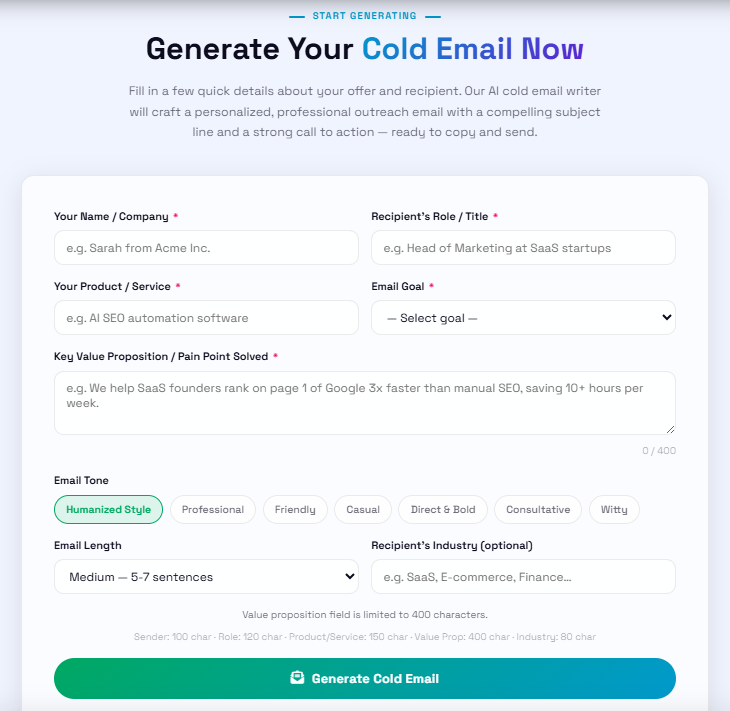
- Your Name/Company: Keep it concise. This sets the signature.
- Recipient’s Role: Be specific (e.g., “CTO of Fintech Startups” rather than “Manager”). The more specific the role, the more targeted the pain point the AI will address.
- Your Product/Service: State exactly what you do.
- Goal: Select your desired outcome (e.g., “Book a demo call” or “Explore a partnership”).
- Key Value Proposition: This is the most important field. Do not just write a feature list. Input a clear benefit: “I help [Target Role] achieve [Result] by [Your Method].” (e.g., “I help SaaS founders reduce churn by 20% by implementing automated lifecycle email flows.”)
2. Optimal Setting Combinations
To get “Humanized” results that avoid the “AI-Robot” feel, use these settings:
| Scenario | Recommended Tone | Recommended Length | Why? |
| High-Level Exec Outreach | Direct & Bold | Short | Respects their time, cuts to the chase immediately. |
| B2B Partnership Pitch | Consultative | Medium | Requires more context to establish trust. |
| Creative/Freelance Outreach | Humanized Style | Short | Keeps it conversational and authentic to a creator’s voice. |
3. Pro-Tips for “Humanizing” the Output
Even with the best AI, “Humanizing” is a two-way street. Learn these three “final mile” steps:
- Add a “Hook” Sentence: After you generate the email, manually add one sentence in the first paragraph that references something specific about them (e.g., “I saw your recent LinkedIn post about [Topic] and loved your take on…”).
- Use the “Humanized” Tone by Default: This tone is specifically optimized to avoid the flowery, verbose language typical of mass-generated AI content.
- The “Under 150 Words” Rule: Even if you choose “Long” length, try to edit the final output down to under 150 words. Brevity is a sign of respect for the recipient’s time.
How to Optimize Your Prompts for Maximum Replies
The quality of your email is directly tied to the inputs you provide. To get the best output from the generator, follow these three rules:
- Be hyper-specific with the “Value Proposition”: Instead of saying “I help with SEO,” say: “I help e-commerce store owners reduce cart abandonment by 15% within 90 days using targeted on-site optimization.”
- Define the “Recipient Role” clearly: Writing to a Marketing Director is different from writing to a Startup Founder. The tool uses this role to tailor the tone and pain points.
- Always include a “Credibility Signal”: If you have a case study or a specific result, mention it in the value prop field. “Helped a local bakery increase online orders by 40%.”
Why This Tool Beats Generic AI Chatbots (Like ChatGPT and Claude)
When trying to write a cold email, most people open ChatGPT or Claude and type something like: “Write a cold email to a marketing director for my SEO services.”
What do they get back? A generic, overly polite wall of text packed with robotic AI clichés like:
“I hope this email finds you well. I am reaching out to explore potential synergies regarding your esteemed company…”
By the second sentence, the recipient hits delete.
Your AI Cold Email Generator completely bypasses this problem for several distinct reasons that make it far superior for marketers and freelancers than a generic chatbot:
1. Hardcoded Backend Prompting (No Robotic AI-Speak)
With a general chatbot, you have to spend five minutes writing a complex prompt just to stop it from sounding like a robot.
- The Tool Advantage: The backend of your tool already has strict behavioral constraints built into its prompt architecture. It is explicitly programmed to forbid traditional AI sentence structures, corporate jargon, and filler words. It enforces a natural, humanized cadence from the very first click, saving users the trial-and-error phase of prompt engineering.
2. Structured Multi-Field Input vs. Open-Ended Guesswork
Generic chatbots rely entirely on a blank text box, which often leads to vague inputs and vague outputs.
- The Tool Advantage: Your generator forces users to input specific, high-leverage data points: Your Name, Recipient’s Role, Product/Service, Goal, and Value Proposition. By breaking the input down into structured fields, the tool forces the user to clarify their offer before the AI even starts writing. Garbage in, garbage out is replaced with specific inputs, high-converting outputs.
3. Built-In Outreach Psychology & Structure
General chatbots treat an email like an essay or a blog post—they try to explain everything all at once.
- The Tool Advantage: Your tool is hardwired for conversion psychology. It automatically builds the email around a proven 5-part cold outreach framework: a low-friction subject line, a personalized hook, a sharp benefit-driven pitch, a micro-credibility signal, and one single call-to-action (CTA). ChatGPT won’t naturally structure an email for response rates unless heavily micro-managed.
4. Zero Friction, Zero Context-Switching
To get a good result from ChatGPT, you often have to have a multi-turn conversation (“Make it shorter,” “Make it less formal,” “Add a subject line”).
- The Tool Advantage: It is a dedicated, single-purpose utility. Users don’t need to log in, create an account, or chat back and forth with a bot. They fill out a clean form, select their tone and length, and walk away with a ready-to-send email in under 10 seconds.
Real Feedback from Marketers
We’ve been monitoring how professionals use this tool to grow their freelance businesses:
“I used to spend 30 minutes per cold email. Now I use the generator to get a solid structure in 30 seconds, add a quick personal reference, and I’m done. My reply rate for my web design services jumped from 2% to 8% because the emails actually sound like me.” — Sarah M., Digital Marketing Manager
“Finally, an AI tool that doesn’t sound like a robot. The ‘Direct & Bold’ tone is perfect for reaching out to busy executives who don’t have time for fluff.” — James T., Content Blogger
Frequently Asked Questions (FAQs)
Yes, 100% free with no login required.
No, your inputs are processed and then discarded; we value your privacy.
Templates get stale fast; customized emails show you actually did your research.
No. Always tweak the first line to address something specific to the recipient.
Aim for 50–150 words. Busy people love brevity.
Generally, Tuesday through Thursday mid-morning is a safe bet.
Not anymore. The tool provides the structure; you just provide the specifics.
Most deals happen in the follow-up. Wait 3–4 days, then send a polite “bumping this up” note.
Yes, you can copy directly or export to docx.
Use the “Casual” or “Friendly” tone setting in the tool.
Absolutely not.
If you personalize the greeting and maintain a high-quality sending domain, you are safe.
If one cold email lands you a $1,000/month retainer, you’ve already seen a massive ROI on a free tool.
Re-evaluate your subject line or your value proposition. Don’t be afraid to test a different angle.
There are no limits—feel free to A/B test as much as you need.